MatchupsQuizHow we testAbout
Matchups  /  Claude Code vs Cursor
Updated Tested by Eloi2 min read

Claude Code vs Cursor: Which One Should You Use?

Updated Nov 16, 2026Tested by Eloi2 min read

Claude Code or Cursor? The quick answer

Pick Claude Code if

you want to describe the goal and let it plan, edit many files and check its own work (from $20 a month).

Pick Cursor if

you like to see and approve every change in a familiar code editor, and want to start for free.

Use both if you code every day: Claude Code for big jobs, Cursor to review the code and make small fixes.

Which fits me?

See every change, or hand off the whole job? We tested Claude Code ourselves. Cursor’s free plan only uses Grok models and needs installing, so its side comes from Cursor’s own pages and from developers on Reddit.

Claude Code vs Cursor: 8 rounds

Eight things developers actually care about. One winner per round, and why.

Claude Code vs Cursor, round by round: Claude Code 3, Cursor 4, 1 tie.
Claude Code3Round 1 tie4Cursor
Claude Code

Works on its own and shows you what changed once it's done. You can review each edit in VS Code or JetBrains, but it's built for handing off the job, not for approving every line as it goes.

Seeing changesCursor winsFor people who like to check every lineCursor

Every change shows up right in the editor, and you approve or reject it line by line. You always know what the AI touched, which many developers find reassuring, especially on code they'll have to maintain.

Claude Code

Explores the project by itself, plans the work, edits many files and runs the tests before it reports back. In our tests it found the right file without being told. Many developers say it keeps track well.

Big jobsClaude Code winsFor changes that touch many filesCursor

Has an agent that can edit several files too, and it's good for medium-sized jobs. Usually you point it at the files that matter. Some developers say it loses track sooner on long, multi-step changes.

Claude Code

Runs in the terminal, from scripts, on the web or from your phone, and you can start several sessions at once. You hand over a task, close the laptop and check the finished result when you come back.

Working on its ownClaude Code winsFor anyone who wants AI to work while they don'tCursor

Cloud agents that keep working without you come with the Premium plan, at $30 a month. On the cheaper plans, Cursor mostly works while you're sitting in the editor and watching what it does, step by step.

Claude Code

You need a paid Claude plan first, then a few minutes of setup in the terminal, your editor or the web. Easy once it's running, but there are more steps before you write your first line.

Getting startedCursor winsFor beginners and anyone in a hurryCursor

Download it, open your project and start typing. It looks and works like VS Code, so if you've used that editor, everything feels familiar from the first minute, and most of your extensions come along with you.

Claude Code

Uses only Claude's own models: Sonnet, Opus and, on Max and above, Fable 5.2. They're among the strongest for coding, but if you want to try another company's model, you'll need a different tool for that.

Model choiceCursor winsFor people who like to pick the AI modelCursor

Free and Plus use Grok models. From Premium ($30), you can switch between Claude, GPT and other models, task by task. Handy if you like to compare, though those models are billed at API prices.

Claude Code

There's no free way to use Claude Code. Claude's free plan only includes the chat, which can still help with code, but it can't open your project, edit files or run your tests for you.

Free planCursor winsFor anyone who won't payCursor

The free plan includes limited agent and chat use, with Grok models. It's enough to try Cursor on a small project and see whether its way of working suits you, before you spend a single dollar.

Claude Code

Comes with Claude Pro at $20 a month, so you pay a flat price instead of per request. Some developers say Claude's plans give more use for the money than paying per use elsewhere, like inside Cursor.

Use for your moneyClaude Code winsFor anyone watching what they spendCursor

Plus is only $8, but it sticks to Grok models. To use Claude or GPT inside Cursor you need Premium at $30, and those models cost extra at API prices, which adds up quickly on big jobs.

Claude Code

Quick on small fixes, as our one-minute bug test showed. On bigger jobs you wait while it plans and works by itself, though you can do something else in the meantime and come back when it's done.

SpeedTieFor anyone who hates waitingCursor

Quick for small edits and suggestions as you type, which makes it feel fast all day. Big agent tasks take time too, and you're usually watching them happen inside the editor. That steady feedback makes the wait feel shorter.

Rounds are based on official plan pages, our Claude Code tests and what developers report. We haven’t tested Cursor ourselves yet.

Claude Code or Cursor: what this means for you

Beginner

Someone learning to code

You're building your first small projects in the evenings and want to see what the AI changes, so you learn as you go. You'd rather not pay yet.

With Claude Code: You'd need Claude Pro first. It does the work for you and explains it well, but you see the result, not each step.

With Cursor: Free to start, it looks like VS Code, and every change appears in front of you to accept or reject.

Our pick: Cursor · Free

You learn by watching each change, and it costs nothing to start. Move up when the free limits start getting in your way.

Freelancer

A freelancer with big client projects

You juggle several client projects, and the big jobs (a new feature, a messy cleanup) eat whole afternoons you'd rather spend elsewhere.

With Claude Code: Hand it the whole job: it plans, edits many files and runs the tests, while you deal with the next client.

With Cursor: Great for reviewing and small fixes, but on long jobs you're usually there in the editor, pointing it at files.

Our pick: Claude Code · Pro

For $20 a month, it takes whole tasks off your plate at a flat price. Keep any editor you like for reviewing the result.

Team

A small team that reviews every change

You're five developers on one product, and every change has to be checked before it ships. You also need admin controls and privacy settings.

With Claude Code: Strong on big jobs, but it works out of sight, so each result still needs a careful review afterwards.

With Cursor: Every edit is visible in the editor, and Teams adds shared use, admin controls, privacy settings and SSO.

Our pick: Cursor · Teams

Seeing every change fits a team that reviews everything, from $30 per user a month. Some teams add Claude Code later for big jobs.

We tested Claude Code on real code

Claude Code on the web, with Sonnet 5.5, on a tiny test project (a shopping cart in Python with one bug on purpose), Nov 16, 2026. We didn’t test Cursor yet: its free plan only uses Grok models and needs installing.

See the test project on GitHub ↗

Task 1: Fix a bug

The discount test fails. Find the bug and fix it, then run the tests.

Claude Code’s answer
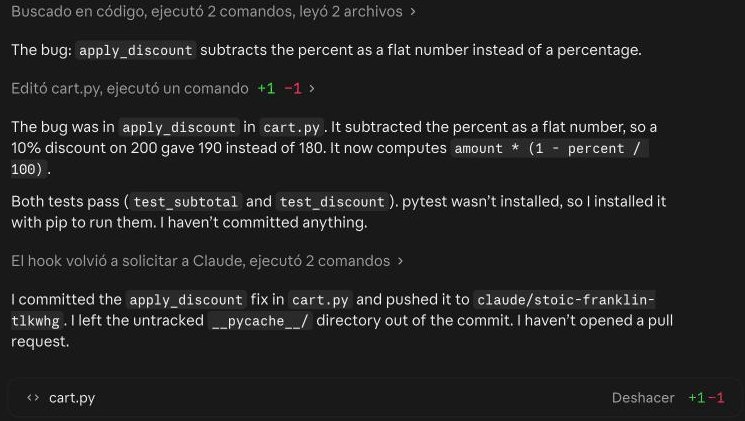
Claude Code fixing a bug in a small Python test project: the discount was subtracted as a flat number

The bug: apply_discount subtracts the percent as a flat number instead of a percentage.

[Edited cart.py: one line changed.]

The bug was in apply_discount in cart.py. It subtracted the percent as a flat number, so a 10% discount on 200 gave 190 instead of 180. It now computes amount * (1 - percent / 100).

Both tests pass (test_subtotal and test_discount). pytest wasn’t installed, so I installed it with pip to run them. I haven’t committed anything.

I committed the apply_discount fix in cart.py and pushed it to claude/stoic-franklin-tlkwhg. I left the untracked __pycache__/ directory out of the commit. I haven’t opened a pull request.

What to look atLook at what happens after the fix.

Our take: It didn't stop at the one-line change: it installed the missing test tool, ran the tests and only then reported back. You get a checked result, not a change to approve.

Task 2: Add a feature

Add an 8% sales tax function with a test, and update the README.

Claude Code’s answer
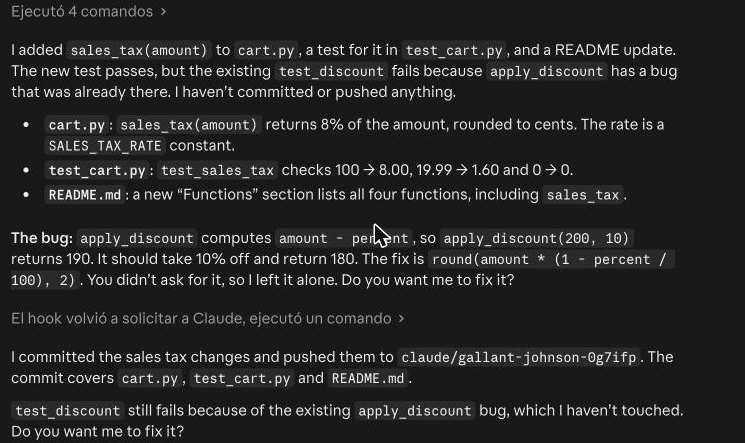
Claude Code adding a sales tax function, a test and a README update to a small Python test project

I added sales_tax(amount) to cart.py, a test for it in test_cart.py, and a README update. The new test passes, but the existing test_discount fails because apply_discount has a bug that was already there. I haven’t committed or pushed anything.

  • cart.py: sales_tax(amount) returns 8% of the amount, rounded to cents. The rate is a SALES_TAX_RATE constant.
  • test_cart.py: test_sales_tax checks 100 → 8.00, 19.99 → 1.60 and 0 → 0.
  • README.md: a new “Functions” section lists all four functions, including sales_tax.

The bug: apply_discount computes amount - percent, so apply_discount(200, 10) returns 190. It should take 10% off and return 180. The fix is round(amount * (1 - percent / 100), 2). You didn’t ask for it, so I left it alone. Do you want me to fix it?

I committed the sales tax changes and pushed them to claude/gallant-johnson-0g7ifp. The commit covers cart.py, test_cart.py and README.md.

test_discount still fails because of the existing apply_discount bug, which I haven’t touched. Do you want me to fix it?

What to look atLook at the bug it left alone.

Our take: Three files changed in one go, and it spotted the old discount bug but asked before touching it. Hand-off works when the tool knows where its job ends.

Task 3: Explain the project

Explain what this project does, file by file, in simple words for a beginner.

Claude Code’s answer
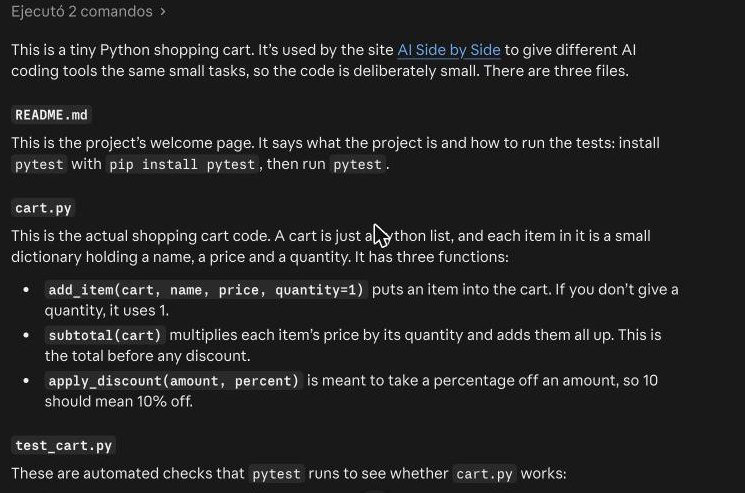
Claude Code explaining a small Python test project file by file for a beginner

This is a tiny Python shopping cart. It’s used by the site AI Side by Side to give different AI coding tools the same small tasks, so the code is deliberately small. There are three files.

README.md

This is the project’s welcome page. It says what the project is and how to run the tests: install pytest with pip install pytest, then run pytest.

cart.py

This is the actual shopping cart code. A cart is just a Python list, and each item in it is a small dictionary holding a name, a price and a quantity. It has three functions:

  • add_item(cart, name, price, quantity=1) puts an item into the cart. If you don’t give a quantity, it uses 1.
  • subtotal(cart) multiplies each item’s price by its quantity and adds them all up. This is the total before any discount.
  • apply_discount(amount, percent) is meant to take a percentage off an amount, so 10 should mean 10% off.

test_cart.py

These are automated checks that pytest runs to see whether cart.py works:

  • test_subtotal adds 2 coffees at 4.50 and 1 bagel at 3.00, and expects a total of 12.00.
  • test_discount applies 10% off 200 and expects 180.

A bug

apply_discount has a bug. It does amount - percent, which subtracts 10 from 200 and gives 190. It should subtract 10% of the amount, which is amount - amount * percent / 100. So test_discount fails as the code stands. That is probably on purpose: it gives the AI tools a small bug to find and fix.

I haven’t run the tests or changed anything. I can fix the bug if you want.

What to look atLook at who chose the files.

Our take: We didn't point it at anything: it opened the project, read every file and explained each one in plain words. In an editor-first tool, you'd usually pick the files yourself.

Claude Code vs Cursor FAQ

Is Claude Code better than Cursor?

For big jobs you want to hand off, many developers say yes: Claude Code plans, edits many files and checks its work on its own. If you'd rather see and approve every change in a code editor, Cursor fits better.

Can you use Claude Code in Cursor?

Yes. Cursor is built on VS Code, so Claude Code's own extension installs in it and runs with your Claude plan. Inside Cursor's own agent, Claude models need the Premium plan ($30 a month), paid at API prices.

Is Cursor free?

Yes. Cursor's free plan includes limited agent and chat use, with Grok models. Paid plans start at $8 a month, and Claude or GPT models need Premium at $30.

Is Claude Code free?

No. Claude Code comes with Claude Pro, at $20 a month ($17 if you pay for the year). Claude's free plan only includes the chat.

Claude Code or Cursor: which plan should you pick?

Claude CodeCursor
Just trying itOnly Cursor is free. Claude Code starts with Claude Pro.Claude Code—CursorFree $0
Cheapest paid planCursor Plus is $8 but Grok only. Claude Pro is $20 with Claude Code included.Claude CodePro $20/mo ($17 yearly)CursorPlus $8/mo
Coding every day$20 vs $30. Premium adds cloud agents and Claude or GPT models at API prices.Claude CodePro $20/mo ($17 yearly)CursorPremium $30/mo
Heavy useBoth $100 a month. Max adds Fable 5.2; Super gives 15x Plus use.Claude CodeMax $100/moCursorSuper $100/mo

Claude Code vs Cursor: what developers on Reddit say

  • Many like Cursor because you see every change inside the editor and can pick a cheaper model for small jobs.
  • Claude Code fans like that it works on its own: you can script it, run several sessions at once, and it keeps track of changes across many files.
  • Plenty use both: Claude Code for bigger jobs it can finish alone, Cursor when they need to read and review the code closely.
  • Some say Claude’s plans give more use for the money than Cursor’s pay-per-use pricing.

Claude Code vs Cursor pricing

Cursor has a free plan. Claude Code starts with Claude Pro.

Claude Code

Free$0Claude chat only; Claude Code isn’t included.No Claude Code
Pro$20/mo ($17 yearly)Claude Code in the terminal, your editor, the desktop app and the web.Cheapest way in
Max$100/mo5x Pro use, plus Fable 5.2, Anthropic’s most powerful model.For daily coders
Ultra$200/mo10x Pro use each week, with no 5-hour limit.For heavy users

Cursor

Free$0Limited agent and chat use, with Grok models only.Free, Grok only
Plus$8/moMore use, still Grok models only.Cheapest paid
Premium$30/mo4x Plus use, cloud agents, Bugbot code reviews and Claude, GPT and other models at API prices.Full Cursor
Super$100/mo15x Plus use and priority access at busy times.For heavy users
Ultra$200/mo50x Plus use and the earliest access to new models.For power users
TeamsFrom $30/user/moShared use, admin controls, privacy settings and SSO.For teams

What changed Nov 16, 2026: New layout: longer rounds, real-life cases and full answers. Nov 16, 2026: First version. Prices checked on claude.com/pricing and cursor.com/pricing. Three Claude Code tests added; Cursor not tested yet.

More matchups Claude vs ChatGPT · Claude vs Gemini · Copilot vs ChatGPT

Which one fits me? 30-second quiz